



Why is your SEO not working? Run these 5 checks in Search Console, from indexing to intent, to find what's holding back your Google traffic and leads.
You've been paying for SEO for months. The reports show activity, the invoices keep arriving, and your phone still isn't ringing.
So why is your SEO not working? Is it the agency, the keywords, Google, or you?
Sound familiar? Most of the time it's one of five fixable problems, and you can tell which one in about an hour with free tools. This guide walks you through the checks in the order I'd run them.
Key Takeaways
- Most 'SEO not working' cases come down to five causes: Google can't index the pages, you're chasing keywords you can't win yet, the content doesn't match what searchers want, you're measuring the wrong thing, or you haven't waited long enough.
- Google says some changes take effect in a few hours while others take several months, so judging a campaign after four weeks usually tells you nothing.
- Ahrefs found that 72.9% of pages ranking in the top 10 are more than three years old, so brand-new pages rarely win competitive terms fast.
- Check indexing first. A page Google hasn't indexed can't rank, however good it is.
- Impressions without clicks and clicks without leads are two different problems with two different fixes, and Search Console shows you which one you have.
- If everything checks out and results are still flat, the usual cause is a mismatch between the page and the search intent, not a technical fault.
The Short Answer: Why Is Your SEO Not Working?
Your SEO is usually not working because of one of five things: your pages aren't indexed, your keywords are too competitive for your site today, your content doesn't match search intent, you're tracking the wrong numbers, or you're judging too early. Work through them in that order, because each check is quicker and cheaper than the next.
Step 1: Check That Google Has Indexed Your Pages
Start with the boring one. If Google hasn't indexed a page, nothing else matters. Google's own guide lists the usual blockers: robots.txt rules, noindex tags, pages behind a login, soft 404s, and content that depends on JavaScript Google can't process.
Open Search Console and go to the Page indexing report. Then paste your most important URL into the URL Inspection tool.
Two statuses cause the most confusion. Google defines 'Crawled - currently not indexed' as a page it fetched but chose not to add to the index, and 'Discovered - currently not indexed' as a page it found but hasn't crawled yet. The first is often a quality or duplication signal. The second is often a crawl-priority signal.
What to look for:
- Key service or product pages listed as 'URL marked noindex' (a leftover from a site build is common).
- Pages 'blocked by robots.txt' that you actually want found.
- Pages that exist but have no crawlable internal links pointing to them.
- Dozens of thin or near-duplicate pages sitting in 'Crawled - currently not indexed'.

If your money pages aren't indexed, fix that before you spend another pound or dollar on content or links. Our technical SEO work usually starts here for exactly this reason.
Step 2: Are You Chasing Keywords You Can't Win Yet?
This is the most common mismatch I see. A new or small site targets 'SEO services' or 'running shoes', then wonders why page ten is its ceiling.
The age of the pages that win tells you why. According to Ahrefs, 72.9% of top-10 pages are more than three years old, up from 59% in 2017, and the average age of a #1 page is five years.
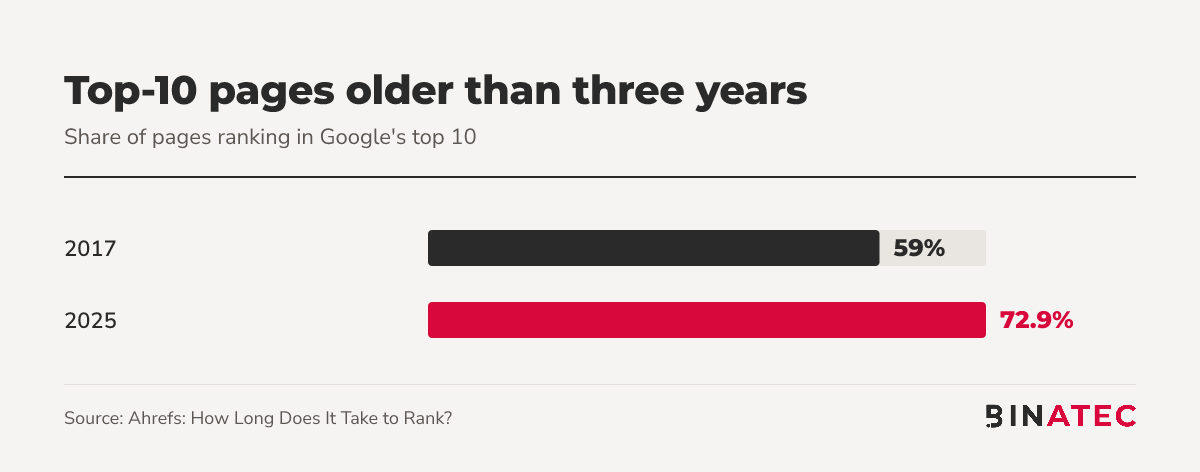
Older pages have had time to earn links, clicks and trust. That doesn't mean you can't compete. It means you should pick your fights.
A simple way to choose keywords you can win:
- List 20 searches your ideal customer would type just before buying (specific, with a place, product type or problem in them).
- Search each one and look at who ranks. If page one is all big brands and publishers, park it.
- Keep the ones where smaller sites and specialist pages appear.
- Build pages for those first, then work up to the bigger terms as your site earns authority.
Step 3: Does Your Page Match What Searchers Want?
Google can index your page and still rank it nowhere, because it answers a different question from the one being asked.
Search your target query and read the top three results. Note the format (guide, list, comparison, product page, price table), the questions they answer and the depth they go to. If page one is all how-to guides and your page is a sales pitch, that's your answer.
Google says that creating helpful, reliable, people-first content is likely to influence your presence in search results more than any other suggestion in its starter guide. That's the standard your page is judged against.
Signs of an intent mismatch
- You rank on page two or three but never move, whatever you tweak.
- Visitors arrive and leave within seconds.
- Your page is a service page for a query that wants an explainer, or the reverse.
The fix is usually rewriting the page to give the format searchers expect, then adding what the others miss: a worked example, real numbers, a clear next step. Our SEO and content marketing teams do this every week.

Step 4: Are You Measuring the Right Thing?
'Rankings' isn't a result. Sales and leads are. Search Console shows you where the problem sits, if you read it correctly.
One catch: Google explains that the position figure is the topmost position your link held, averaged across all queries and impressions. An 'average position' of 14 can hide a page ranking third for one search and fortieth for another.
Read the Performance report like this:
- High impressions, low clicks: you're visible but your title and description aren't winning the click. Rewrite them around the exact query.
- Clicks but no leads: the traffic is right but the page doesn't convert. That's a conversion problem, not an SEO one (see our guide to improving landing page conversion rate).
- Few impressions: Google doesn't see the page as relevant, or isn't indexing it. Go back to Steps 1 and 3.
- Lots of traffic from your brand name only: people already know you. SEO isn't yet finding new customers.
Also check that Search Console and GA4 are connected to the right site and that your lead forms are tracked. We've seen more than one 'SEO isn't working' complaint turn out to be a broken form.
Step 5: Have You Given It Enough Time?
Google says some changes take effect in a few hours and others several months, and suggests waiting a few weeks before deciding whether a change helped.
The timing data is mixed in a useful way. Ahrefs reports that 40.82% of pages that reached the top 10 did so within a month, but it also found that only 1.74% of one million random new URLs reached the top 10 within a year (6.11% in a second sample of English pages with content). A few pages move fast, most never get there.
Read that as: set a 90-day checkpoint for early signals (more impressions, more indexed pages, new queries), and a 6-12 month view for revenue. Our guide on how much SEO costs covers what to expect at each budget.
SEO Not Working in Action: A Quick Diagnosis Example
Imagine a local plumber with a 12-page site. Traffic is flat after five months.
Check 1 shows the 'Emergency plumber' page is marked noindex from the site build. Fixing it is a five-minute job. Check 2 shows the site targets 'plumber' for the whole country when searchers want 'boiler repair' plus a town. Check 3 shows page one is full of service pages with prices and reviews, while theirs has none.
Three fixes, none of which needed more links or more blog posts. That's a made-up illustration, not a client result, but the pattern is a real one: the cause is rarely where people look first.
When SEO Isn't the Right Fix
Sometimes the honest answer is that organic search is too slow for your goal. If you need leads this month, paid search or a strong local profile will move faster while SEO compounds in the background. If your site has no clear offer or a weak conversion path, more traffic will just waste more money. Read our take on PPC vs SEO if you're deciding where to put the next pound or dollar.
FAQs
Why is my SEO not working after 3 months?
Three months is often too early for revenue but long enough to see signals. Check that your key pages are indexed, impressions are rising and new queries are appearing in Search Console. If none of that is happening, there's a technical, targeting or intent problem to fix.
How long does SEO take to show results?
It depends on competition and site age. Google says changes can take hours to several months. Treat 90 days as the first checkpoint for impressions and indexing, and six to twelve months as the window for meaningful leads and sales on competitive terms.
Why is my website not showing up on Google?
Usually it isn't indexed. Check the Page indexing report and URL Inspection in Search Console for noindex tags, robots.txt blocks, or 'Discovered - currently not indexed'. If it is indexed, you may simply be ranking too low for the searches you expect.
Why do I get impressions but no clicks?
It means you're being shown but not chosen. Your ranking may be low on the page, or your title and description don't match what the searcher wants. Rewrite them around the exact query and check whether a different page format dominates the results.
Should I fire my SEO agency?
Not on traffic alone. Ask for indexing status, ranking and click data by page, and a clear explanation of what was done and why. If they can't connect the work to impressions, clicks and leads, that's your answer.
Conclusion
When SEO isn't working, the cause is almost always findable: pages that aren't indexed, keywords that are too hard, content that misses intent, or numbers read the wrong way.
This week, open Search Console and run the five checks on your three most valuable pages. Write down what you find before changing anything.
If you'd like a second pair of eyes, we can run the diagnosis for you with a digital audit, or you can get a free quote and tell us where it's stuck.
Sources
- Ahrefs: How Long Does It Take to Rank?
- Google Search Central: SEO Starter Guide
- Google Search Central: Get started with Search
- Search Console Help: Page indexing report
- Search Console Help: Impressions, position and clicks


John Doe
Supreb Information. Thanks
15 July 2014 View replies . 1