



About 70% of shoppers leave without paying. Here is how to reduce cart abandonment: the real reasons they leave and 8 fixes, in order of impact.
Your store gets visitors. Some even add products to the cart. Then most of them vanish before paying.
Sound familiar? You are not imagining it. Baymard Institute puts the average documented cart abandonment rate at 70.22%, calculated across 50 studies. Roughly 7 in 10 carts never become orders.
The good news is that most of those exits have specific, fixable causes. This guide shows you the real reasons shoppers leave and 8 fixes, ordered by how much they tend to matter.
Key Takeaways
- The average documented cart abandonment rate is 70.22%, so a store losing most of its carts is normal, but a store that never tests its checkout is leaving money behind.
- Extra costs at checkout (shipping, tax, fees) are the top fixable reason shoppers leave, cited by 40% of US shoppers in Baymard's study.
- Forced account creation, slow delivery and a long checkout each push roughly one in five shoppers away, and all three are cheap to fix.
- Baymard estimates better checkout design could lift conversion for an average large ecommerce site by 35.26%.
- Recovery emails win back some lost carts, but fixing the leak at the source beats chasing shoppers after they leave.
What Is Cart Abandonment and How Do You Measure It?
Cart abandonment is when a shopper adds a product to the cart and leaves without completing the purchase. The rate is the share of carts that never turn into orders: 1 minus (completed orders divided by carts created).
Check it in your platform analytics and in GA4. Then split it by device, traffic source and checkout step. A single store-wide number hides the real problem, because mobile shoppers from paid social often leave for different reasons than returning customers.
Why Do Shoppers Abandon Their Carts?
Start with the reasons, not the tactics. In Baymard's survey of US online shoppers, 40% said extra costs were too high, more than any other fixable cause. The chart below shows the full picture.
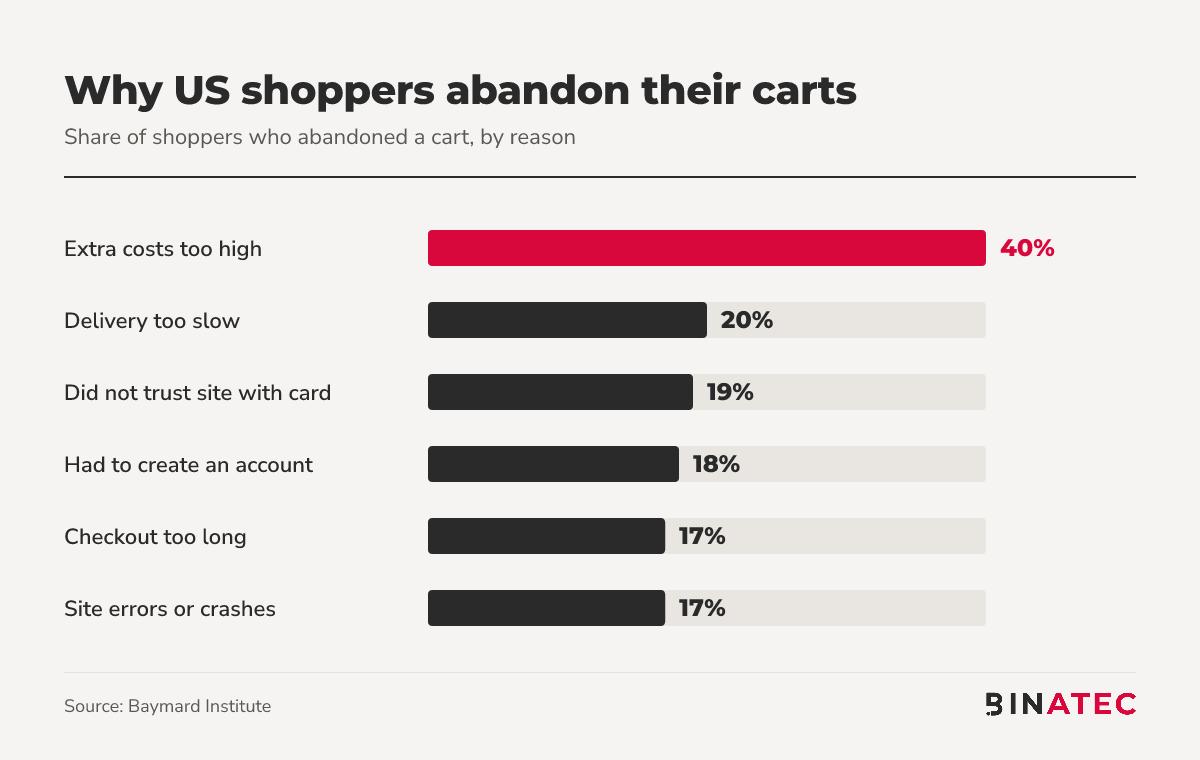
Notice what is missing: price of the product itself. Most exits are about friction and trust at the last step, which is good news because you control both.

How to Reduce Cart Abandonment: 8 Fixes
1. Show the full price before checkout
Surprise costs are the number one reason. Show shipping and tax estimates on the product page or in the cart, not on the last step. If you can, fold shipping into the price or offer a free-shipping threshold. Stripe lists transparent pricing as its first tactic for the same reason.
2. Offer guest checkout
18% of shoppers left because the site wanted them to create an account. Let people pay first. Offer account creation on the confirmation page, when the order is already safe.
3. Cut the checkout down
17% said the checkout was too long or complicated. Remove every field you do not need to ship the order, enable address autofill, and drop pages that only add steps. Every extra field is a reason to stop.
4. Speed up delivery promises and the site itself
20% left because delivery was too slow, and another 17% hit errors or crashes. Show delivery dates up front, and make sure your checkout loads fast on a phone. Our guide on how to improve website speed covers the fixes that matter most.

5. Build trust where the card goes in
19% did not trust the site with their card details. Use recognised payment methods, show security and returns information near the pay button, and keep the checkout design consistent with the rest of the store. If your site looks great but still does not convert, see why a professional site may not convert.
6. Add the payment methods your buyers expect
9% left because there were not enough payment methods, and 10% had a card declined. Wallets such as Apple Pay and Google Pay, plus a second route when a card fails, save orders you have already earned.
7. Make returns easy to find
13% said the returns policy was not satisfactory. Put a plain-language returns summary on the product page and in the cart. Hiding it makes the buyer assume the worst.
8. Recover the carts that still leave
Some shoppers will always leave. Follow up. On Shopify, a checkout counts as abandoned after ten minutes once the shopper has entered an email, and you can set recovery emails under Apps, Messaging, Automations. Test the send delay rather than guessing.
Remember the first row of Baymard's data: 42% of abandoners were just browsing. Not every lost cart is a lost sale, so measure recovery against shoppers who showed real intent.
How to Find Where Your Own Store Leaks
Benchmarks tell you what is typical. Your data tells you what is wrong. Before you change anything, build a simple funnel from product page to cart, to checkout start, to payment, to order.
Look for the biggest drop and ask one question about it:
- Cart to checkout start: are costs or delivery times a surprise?
- Checkout start to payment: is the form too long, or is account creation blocking people?
- Payment to order: are cards failing, or is the page throwing errors on certain phones?
Then watch five real sessions on mobile with a free session-recording tool, and pay for nothing until you have seen where people stall. One hour of watching beats a week of guessing.
Cart Abandonment Fixes in Action: A Quick Example
Picture a store with 1,000 carts a month and a 70% abandonment rate, so 300 orders. Say the checkout surprises people with a shipping fee on the last step, forces account creation and asks for 14 form fields.
A sensible order of work:
- Show shipping costs in the cart (the biggest reason, 40%).
- Switch on guest checkout (18%).
- Trim the form to the fields you need (17%).
- Turn on recovery emails for the carts that still leave.
This is an illustration, not a client result. The point is the order: fix the biggest sourced reason first, then the cheap ones, then recover what is left.
When These Fixes Will Not Help
If most of your abandoners are just browsing, checkout work will not move the number much. That is common on stores where people use the cart as a wishlist. In that case, work on product pages, reviews and offers first. Our guide to getting more sales on Shopify and the post on landing page conversion are better starting points.
Also treat benchmark numbers with care. Rates vary a lot by industry and device, so compare your store with its own history before you compare it with an average.
FAQs
What is a good cart abandonment rate?
There is no single good number. Baymard's average across 50 studies is 70.22%, so anything well below that is strong. The better test is your own trend: if your rate falls after you change the checkout, the change worked.
What is the biggest cause of cart abandonment?
Extra costs at checkout. In Baymard's study, 40% of US shoppers who abandoned a cart said shipping, tax or fees were too high. Show the full cost early, and you remove the most common reason shoppers leave.
Does guest checkout reduce cart abandonment?
It removes one known cause. 18% of shoppers in Baymard's study left because the site wanted them to create an account. Offer guest checkout and invite them to save details after they have paid.
How do I recover abandoned carts on Shopify?
Open Apps, then Messaging, then Automations, and edit the abandoned checkout emails automation. Choose who receives them and how long after abandonment they send, then save. Shopify only emails shoppers who entered an email address.
Conclusion
Most carts get abandoned, but most of the reasons are fixable. Start with the biggest one: show every cost early. Then remove forced accounts and extra form fields, build trust at the pay button, and recover what is left with a well-timed email.
This week, open your checkout on your phone and buy something as a stranger would. Write down every moment you hesitate. If you would like a second pair of eyes, we are happy to help: get a free quote, or see how our conversion rate optimization and ecommerce work fits your store.
Sources
- Baymard Institute: Cart abandonment rate statistics
- Stripe: How to reduce cart abandonment
- Shopify Help Center: Abandoned checkouts


John Doe
Supreb Information. Thanks
15 July 2014 View replies . 1