



How to get more sales on Shopify without more ad spend: 9 fixes, from checkout costs to abandoned-cart emails, backed by Baymard and Littledata data.
Is your Shopify store getting visitors, but the orders just aren't following?
You check the dashboard, see decent traffic, and then see the sales number. It's lower than it should be. So you spend more on ads, and the gap stays the same.
Sound familiar? You're not alone, and it's rarely a traffic problem first.
Here's the short version of how to get more sales on Shopify: fix what stops people buying (surprise costs, a slow or long checkout, missing trust signals), recover the carts people leave, then add traffic from sources that already convert. Do them in that order and every visitor you pay for is worth more.
This guide gives you nine fixes in that order, with the data behind each one.
Key Takeaways
- The median Shopify store converts around 1.3% of visitors, so most stores lose almost 99 in every 100 visits, and small gains add up fast.
- Baymard found 40% of shoppers who abandon a cart do so because shipping, tax or fees are too high, so showing costs early beats almost any design tweak.
- Guest checkout, fewer form fields and a visible total address several of the top reasons people leave, and none of them cost ad budget.
- Shopify can email shoppers who abandon checkout automatically, and setting it up takes a few clicks in the admin.
- Free Google listings need a clean product feed, so fixing your product data helps you get found and helps you convert.
How Many Sales Should a Shopify Store Get?
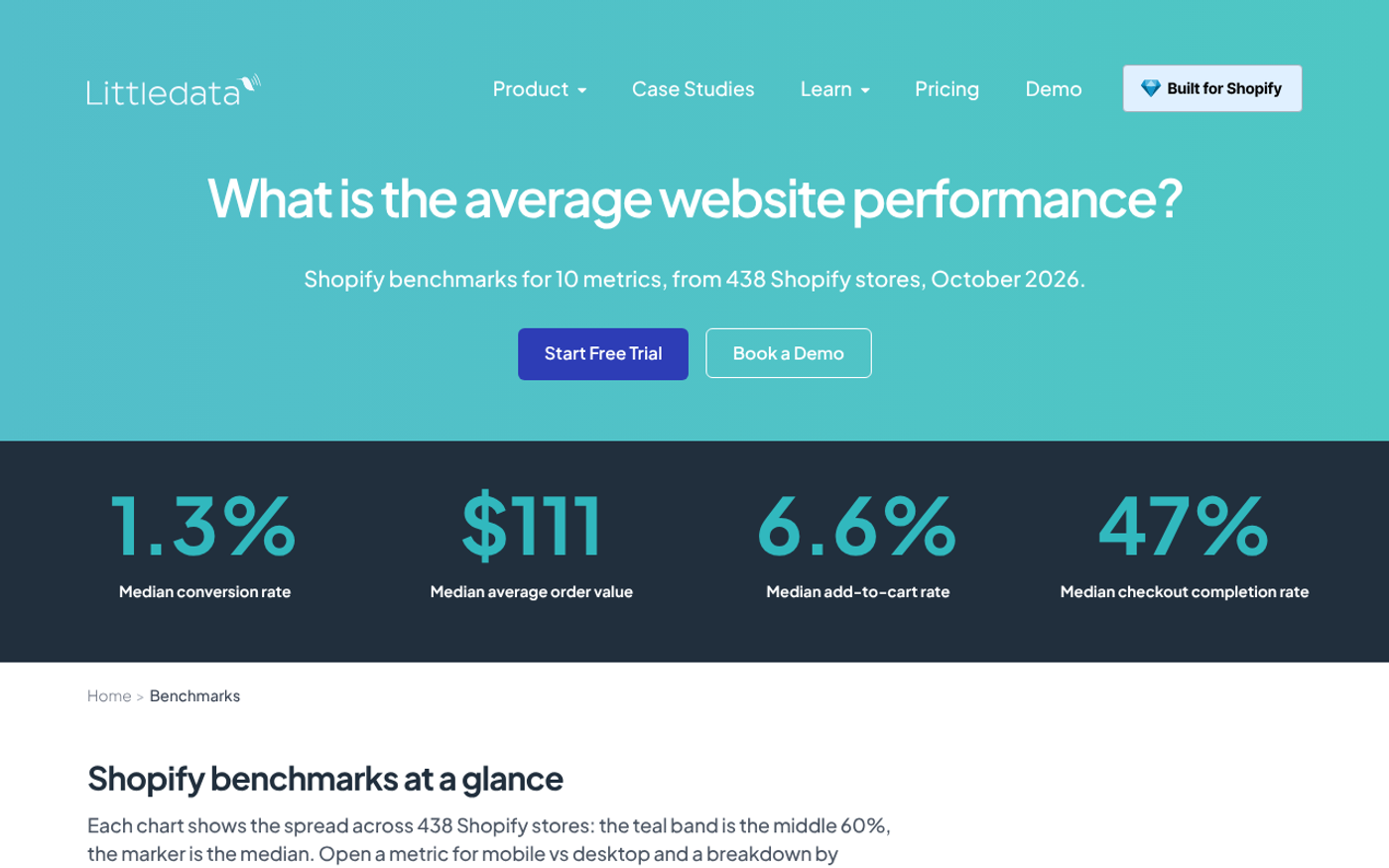
Before you fix anything, know where you stand. According to Littledata's benchmark of 438 Shopify stores (August to October 2026), the median conversion rate is 1.3%. The top 20% convert at 2.7% or more, and the top 10% at 3.6% or more.
Check your own number in Shopify Analytics first. If you're under 1%, you have a store problem. If you're above 2.7%, your gains will come more from traffic and repeat buyers.
Littledata also reports that the median store gets 66% of its traffic on mobile. So test everything on a phone first.
Fix 1: Show the Full Cost Before Checkout
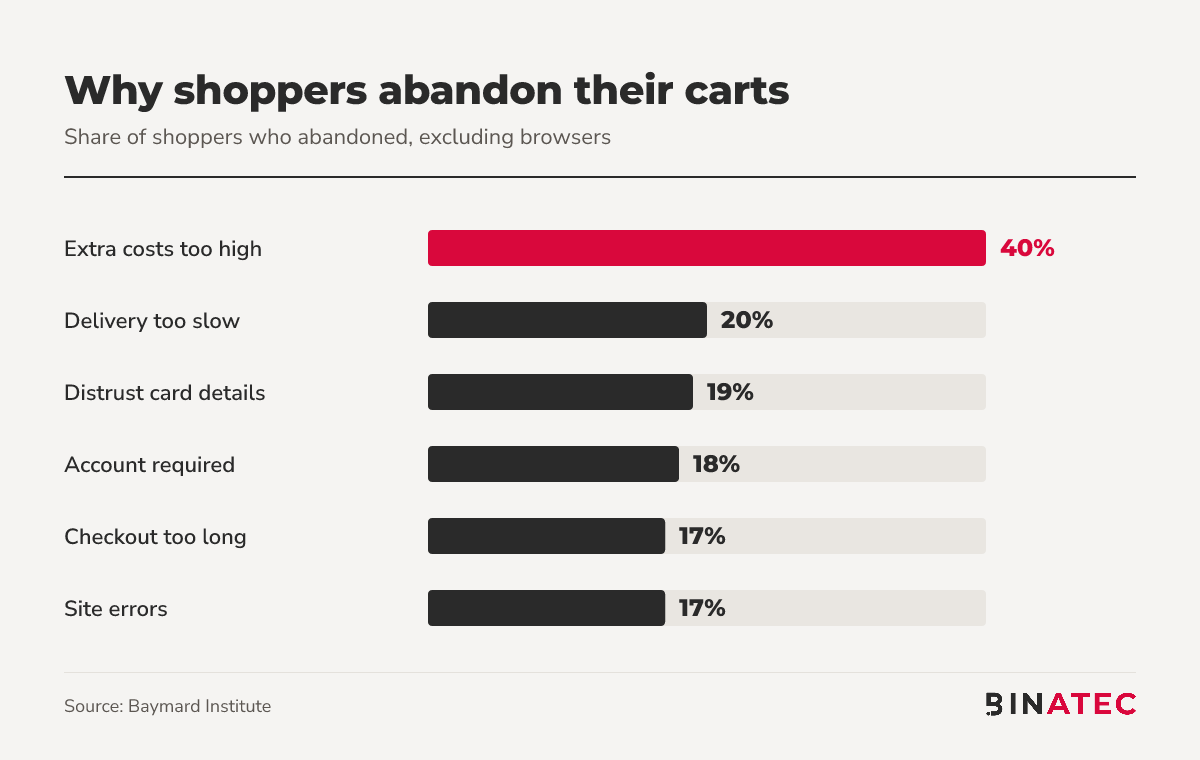
This is the biggest leak. Baymard's research puts the average documented cart abandonment rate at 70.22%, and the number one reason is extra costs: 40% of shoppers who left said shipping, tax or fees were too high. Another 12% left because the total order cost wasn't visible up front.
Here's what that looks like across all the reasons Baymard lists.
What to do in Shopify:
- Put shipping costs and delivery times on product pages and in the footer, not just at checkout.
- Consider free shipping over a set order value, and build the cost into your prices.
- Show a clear total in the cart before the shopper clicks checkout.
Fix 2: Offer Guest Checkout and Cut the Form
In the same Baymard data, 18% of shoppers left because the site forced them to create an account, and 17% said checkout was too long or complicated.
Make accounts optional. Remove fields you don't need, like a second address line or a company name for consumer orders. Every field is a small reason to stop.
Fix 3: Turn On Accelerated Checkout
Shopify says Shop Pay offers as much as 50% better conversion compared to guest checkout, based on an external study from April 2023. That's Shopify's own claim and the page gives no sample size, so treat it as a ceiling, not a promise.
The practical point is simple. Returning shoppers with saved details check out in a few taps. Turn it on, along with the wallets your buyers actually use, and test the flow on mobile. Baymard also found 9% of shoppers left because there were too few payment methods.

Fix 4: Build Trust Where Doubt Starts
Baymard reports that 19% of shoppers left because they didn't trust the site with their card details. Small stores feel this most.
Trust signals worth adding this week:
- A clear returns policy in the footer and on product pages (13% of shoppers left over an unsatisfactory return policy).
- Real customer reviews on product pages, not just the homepage.
- A contact page with an email address and, if you can, a phone number.
- Accepted payment icons near the add-to-cart button.
Fix 5: Make the Store Fast and Mobile-Ready
Baymard lists site errors and crashes as a reason 17% of shoppers left. With two thirds of the median store's traffic on mobile, a slow phone experience hits most of your visitors. Our guide on how to improve website speed covers the fixes, and uninstalling unused apps is usually the quickest win.
Then place a test order yourself, on a phone, from the ad or link a real customer would click. Do it monthly.
Fix 6: Recover Abandoned Checkouts With Email
With around 70% of carts abandoned, even a small recovery rate is real money. Shopify's help centre explains how to switch it on.
- In the Shopify admin, go to Apps, then Messaging, then Automations.
- On the Abandoned checkout emails automation, choose Edit settings.
- Select the option to send abandoned checkout emails automatically.
- Choose who receives them under Send to, and set the delay under Send after.
- Save, then customise the email template so it sounds like your brand.
Know the limits. A checkout only counts as abandoned if the shopper entered an email and left it incomplete for over ten minutes. Emails don't send to shoppers who typed only a phone number. Abandoned checkouts older than three months are deleted.
Once this works, build a fuller email marketing flow with a welcome series and post-purchase emails.
Fix 7: Improve Product Pages
Product pages do the selling. Use original descriptions instead of copying the supplier's, several clear photos, a size or fit guide where relevant, and the delivery estimate beside the buy button.
Put the reviews and the return policy close to the button, not three screens below. If you want a deeper checklist, see our post on improving landing page conversion rate, since the same principles apply to product pages.

Fix 8: Fix Your Product Feed to Get Found Free
Once the store converts, add traffic. One low-cost source is Google's free listings. Google's Merchant Center help says free listings can appear in Search, Maps, Gemini, YouTube, the Shopping tab, Images and Lens, at no cost.
Every product needs an id, title, link, image link, price, description and availability. Apparel also needs colour, size, age group, gender and item group ID. In the US, UK, Canada and Australia, shipping settings are required too.
A clean feed also prepares you for paid Shopping ads and for AI shopping features. We cover that in Is Your Product Feed Ready for Google's AI Checkout Button?.
Fix 9: Bring Buyers Back
Selling again to a customer who already trusts you costs less than finding a new one. Capture emails at checkout, send a thank-you and a how-to-use message, and follow up when it's time to reorder.
Our guide on how to maximise Shopify profits goes further on upsells and bundles.
A Quick Example: Where to Start
Say your store gets 10,000 visits a month and converts at the 1.3% median. That's 130 orders. Reaching Littledata's top-20% mark of 2.7% would mean 270 orders from the same traffic. You didn't buy a single extra click.
This is simple arithmetic on the benchmark, not a forecast for your store. But it shows why fixing conversion before buying traffic usually pays back faster.
When This Advice Doesn't Apply
If you get under a few hundred visits a month, conversion tweaks won't show clear results, because the numbers are too small to read. Focus on traffic and a clear offer first.
Also, benchmarks vary by product and price. A high-priced item will convert lower than a low-priced one, so compare against your own past numbers as much as the median.
FAQs
Why is my Shopify store not getting sales?
Usually it's one of three things: not enough of the right traffic, a checkout that loses buyers, or a lack of trust. Baymard finds extra costs, slow delivery and distrust of card handling are the top reasons shoppers leave. Check your analytics to see where visitors drop off before changing anything.
What is a good conversion rate for a Shopify store?
Littledata's October 2026 benchmark of 438 stores shows a 1.3% median. Above 2.7% puts you in the top 20%, and above 3.6% in the top 10%. Your category and price point matter, so also track your own trend month to month.
How can I get my first sales on Shopify?
Start with people who already know you: email friends, past customers and your social followers. Make shipping and returns clear, add reviews if you have any, and list your products free on Google through Merchant Center. Then test small paid campaigns once the store converts.
Does Shop Pay increase Shopify sales?
Shopify claims as much as 50% better conversion than guest checkout, from a 2023 external study. The figure is Shopify's own, with no published sample size. It is still worth enabling, since faster checkout for returning shoppers removes friction at no cost.
How do I recover abandoned carts on Shopify?
In the admin, go to Apps, Messaging, Automations and edit the Abandoned checkout emails automation. Choose automatic sending, set who receives it and the delay, and save. It only works if the shopper entered an email address before leaving.
Conclusion
The one idea to remember: sales come from removing reasons not to buy before adding more visitors.
This week, place a test order on your phone, list every cost the shopper sees and when, and turn on abandoned checkout emails. That alone can show you what's leaking.
If you'd like a second pair of eyes on your store, our Shopify marketing and conversion rate optimization teams can help. You can get a free quote any time.
Sources
- Baymard Institute: Cart Abandonment Rate Statistics
- Littledata: Average Shopify Conversion Rate
- Shopify: Shop Pay
- Shopify Help Center: Abandoned checkouts
- Google Merchant Center Help: Free listings


John Doe
Supreb Information. Thanks
15 July 2014 View replies . 1