



A study of 700 landing page audits found pages score best on looks and worst on persuasion. See where your site leaks buyers and how to fix it.
Did your last redesign look fantastic and then change almost nothing about your sales?
You approved the mockups. The team loved the typography. Traffic is steady, yet the enquiry form still gets a trickle. Sound familiar?
A July 2026 analysis of 700 landing page audits by Ninjapromo suggests it isn't bad luck. Pages scored highest on how they look and lowest on the things that actually persuade a visitor to buy.
This post walks through what the data says, why a good-looking page can still leak buyers, and a fix list you can work through this month without a rebuild.
Key Takeaways
- In Ninjapromo's 700 audits, the average page scored 51 out of 100 and not one page reached 80.
- Visual brand was the best-scoring area at 7.2 out of 10, while pricing transparency, social proof and CTA discipline sat near the bottom.
- According to the same study, 80% of conversion leaks sit in or above the first screen, so that's where to start.
- A separate review of 441 pages by Landing Doctor found 52% had a weak or generic value proposition.
- Most fixes are copy, proof and layout changes that can ship in days, not a full redesign.
What the Data Actually Says
Ninjapromo analysed 700 completed conversion audits run between May and July 2026. The average score was 51 out of 100 and the median 54. The best page in the sample managed 75, and 72% of pages scored below 60.
The audits also counted leaks, meaning anything that blocks or reverses a buying decision. The average page had 13.2 of them, and 5.4 were critical.
Here's the part that matters most: 80% of those leaks sit in or above the first screen. Visitors decide fast, and most pages lose them before they scroll.

A fair warning on the numbers. The sample is businesses that requested an audit, so it leans towards small and mid-size ecommerce, service and software companies that already buy traffic. It isn't a random sample of the web, and the revenue figures in the report are modelled. Treat it as a strong pattern, not a law.
Landing Doctor's review of 441 pages used a different 12-point rubric and a curated set of mostly well-known brands. It averaged 66.2 out of 100, so don't compare the two scores directly. What's worth noticing is that the two studies point at the same weakness.
Why Looking Professional Isn't Persuading
Ninjapromo scored each page on ten dimensions. Visual brand came out on top at 7.2 out of 10. Pricing transparency came last at 4.3.
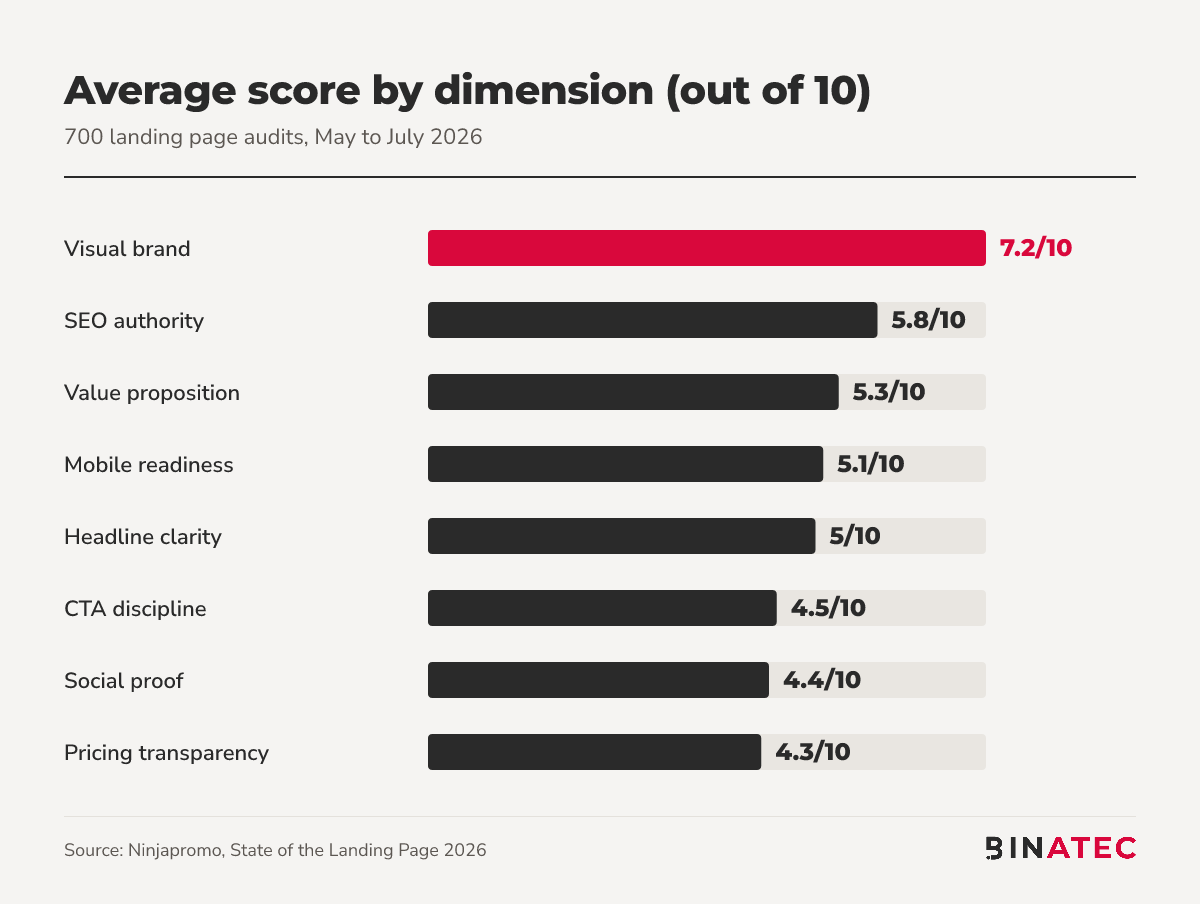
Of the ten dimensions in the study, only visual brand is about design. The other nine measure persuasion: what you say, what you prove, and how easy you make the next step.
In other words, many sites have been polished and few have been argued. A designer can make a page beautiful. Nobody has made it answer the visitor's real question: why should I trust you, and what happens if I click?
Problem 1: No Proof Where the Decision Happens
Trust and proof was the top first-screen problem in 91% of the Ninjapromo audits. That's the single most common theme in the whole study.
It usually looks the same. The testimonials are in a carousel near the footer, the guarantee is on a separate page, and the first screen asks for an email address from someone who has no reason to trust you yet.
The fix is to move proof next to the ask:
- One specific customer quote with a name and role, placed beside the main button.
- A review count and rating from a platform visitors recognise.
- A plain-language guarantee or refund line under the call to action.
- Recognisable client or partner logos, only if you're allowed to show them.
Problem 2: A Headline That Could Belong to Anyone
Landing Doctor flagged a weak or generic value proposition on 52% of pages, and 45% left visitors unsure what the page was even offering. Ninjapromo scored headline clarity at just 5.0 out of 10.
Here's a quick test. Cover your logo and read the headline. If a competitor could paste it onto their own site, it's not doing any work.
Slogans like "Solutions that grow with you" fail the test. A concrete outcome passes it: who it's for, what they get, and in what time frame, if you can say so truthfully.
Problem 3: Mobile Treated as an Afterthought
Across 682 pages tested with Lighthouse, the median mobile score was 48 out of 100, and the bottom quarter scored 36 or lower. Mobile experience was a top first-screen problem in 75% of audits.
Most sites are still reviewed on a large desktop monitor in a meeting room. Your customers are mostly on a phone, on a train, with one thumb.
Open your own page on a real phone before you read any further. Can you see the offer, the proof and a button without scrolling? If not, you've found your first fix.
Problem 4: Competing Buttons and Hidden Prices
CTA discipline showed up as a top problem in 62% of the Ninjapromo audits, and pricing and offer clarity in 55%. Landing Doctor found 19% of pages had no single, obvious call to action.
Think of the last time you couldn't find a price. You probably opened another tab. So does your visitor.
Signs your page has a button problem:
- Three or more buttons with equal visual weight on the first screen.
- Labels like "Submit" or "Learn more" instead of what happens next.
- No price, price range or "what it costs" explanation anywhere near the offer.
A Quick Example: Rewriting One First Screen
To make this concrete, here's a hypothetical service business. It isn't a client, just an illustration of the pattern.
Before: the headline reads "Innovative solutions for modern businesses". Two buttons say "Get started" and "Learn more". The reviews sit at the bottom of the page and there's no price anywhere.
After: the headline names the customer and the result, for example "Bookkeeping for freelancers, done by the 5th of every month". One button says "Get a fixed-price quote". A named customer quote and a starting price sit directly under it.
Nothing about the design changed. The page just started answering the visitor's questions in the order they ask them.

A 5-Step Fix List for This Month
You don't need a rebuild to start. Work through these in order:
- Audit the first screen on a phone. Screenshot it and mark where the offer, proof and main button appear.
- Rewrite the headline so it names who it's for and the outcome they get. Test it with the logo covered.
- Move one piece of proof beside the main button. A real quote, a rating or a guarantee.
- Pick one primary call to action and make every other button visually quieter.
- Show the price or a starting range, or explain clearly how pricing works.
Ninjapromo's audits found a median of 14 quick wins per page, meaning fixes that can ship in days without a redesign. Start with the three that touch the first screen.
Then measure. Watch where visitors click and stop scrolling with heatmap and session analysis, and test one change at a time with UX and A/B testing so you know what moved the number.
When a Redesign Really Is the Answer
This doesn't mean design never matters. Sometimes a rebuild is the right call.
If your platform makes pages painfully slow, if the layout can't be changed without a developer for every edit, or if your brand no longer matches who you sell to, patching copy won't be enough.
Even then, fix the message first. A redesign built on a vague offer just produces a prettier version of the same leak. If you do go ahead, plan the persuasion (headline, proof, pricing, button) before anyone opens a design tool. Our website redesign and landing page work starts there.
FAQs
What is a good landing page conversion rate?
It depends on your industry, traffic source and what counts as a conversion, and published benchmarks disagree widely. The better question is whether your rate is rising against your own baseline. Track it by device and traffic source, and compare each change against your own past results.
Where should I start improving my website's conversion rate?
Start with the first screen on mobile. In Ninjapromo's audits, 80% of leaks sat in or above it. Check that the headline states the outcome, one piece of proof sits near the main button, and there's a single obvious next step.
Do I need a full redesign to fix a low-converting page?
Usually not. Most problems in the audits were message, proof and button issues that can ship in days. A redesign makes sense when the platform is slow, edits are impractical, or your brand no longer fits your buyer. Fix the message first either way.
How do I know if my value proposition is clear?
Cover your logo and show the first screen to someone outside your business for five seconds. If they can't tell you who it's for and what they'd get, it isn't clear. A competitor being able to use the same headline is another warning sign.
Conclusion
A site can look professional and still lose most of its visitors. The studies agree that the gap is rarely visual. It's the words, the proof and the next step.
This week, open your page on your phone and rewrite the headline until a stranger could say what you offer. Then move one real piece of proof next to the button.
If you'd like a second pair of eyes on where your page leaks, our conversion rate optimisation team is happy to look. You can get a free quote whenever it suits you.
Sources
- Ninjapromo: The State of the Landing Page 2026
- Landing Doctor: The State of Landing Page Conversion 2026


John Doe
Supreb Information. Thanks
15 July 2014 View replies . 1