



Google says it is scaling ads in AI Mode and testing sponsored product carousels. Here is what changed, what is still unknown, and what to check in your feed.
Have you checked where your Shopping ads actually show up lately? If you sell products online, some of your next customers may meet your listing inside a Google AI answer, not on a normal results page.
On Google's Q3 earnings call on October 28, 2026, chief business officer Philipp Schindler said Google is scaling ads within AI Overviews and AI Mode to more users and more queries. A few days later, a new test showed paid and unpaid products mixed into one AI Mode carousel.
That is good news if your product data is clean. It is a quiet leak if it isn't.
Here is what actually changed, what Google has not told advertisers yet, and the checks worth doing before the holiday rush.
Key Takeaways
- Google said on its Q3 2026 call that it is scaling ads in both AI Overviews and AI Mode to more users and more queries.
- Shopping ads already appear inside AI Mode carousels, and a new test groups paid and unpaid products under "Sponsored" and "All products" headings.
- Google admits AI Mode earns less per query than classic search, which gives it a reason to push more ad formats into it.
- You can't write these ads yourself, so your Merchant Center feed does most of the talking for you.
- Reporting for AI Mode placements is thin, so judge results by sales, not by a new report.
What Did Google Actually Announce?
Google's short answer: more ads, in more places, inside its AI search experiences. According to Marketing Dive, Google is expanding AI Mode ads internationally and bringing a multi-turn ad format, which appears in follow-up questions, to the US.
Schindler also gave an honest reason for the push. He said that strong growth in AI Mode queries hurt results "because of the lower monetization we were seeing in AI Mode."
Read that plainly. People are using AI Mode more, Google earns less from each of those searches, and the fix is more ads. Expect them to keep coming.
What the Numbers Say
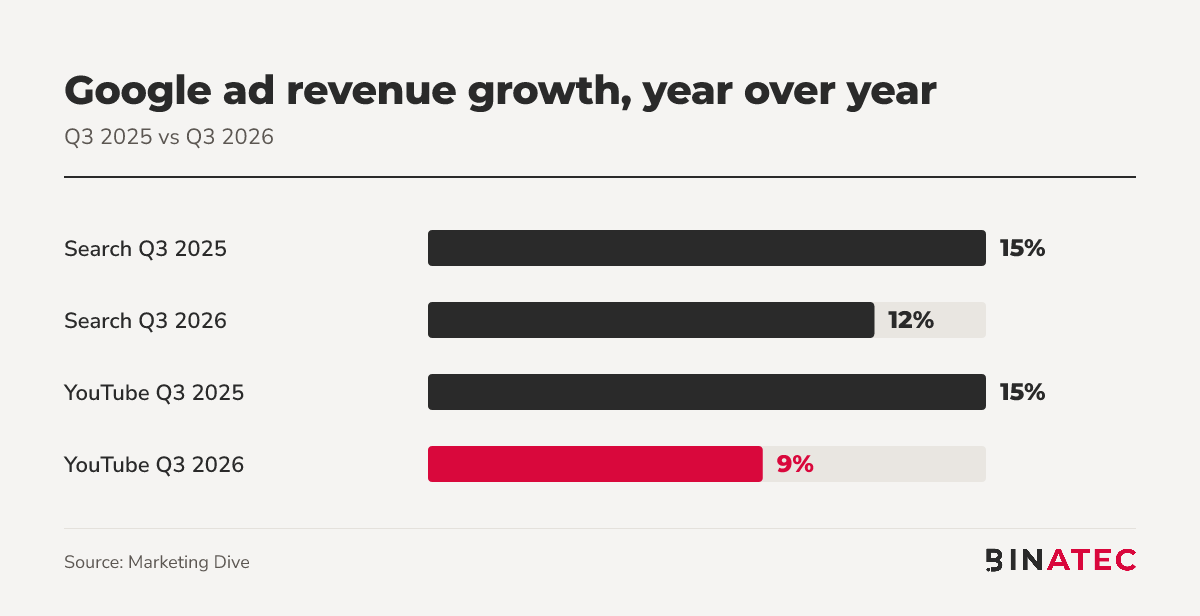
Marketing Dive reports that Search revenue hit $63.4 billion, with Search growth at 12% and YouTube ad growth at 9%, down from 15% each in Q3 2025.
One analysis of Alphabet's filings, from Deepak Gupta, adds that paid clicks rose 8% year over year while cost per click rose 4%. It is a third-party reading, so check the filing before you quote it in a board deck.
The same analysis says Schindler described click-through rates on sponsored and organic product listings inside AI Mode as already similar. Google has not published the figure.
How Shopping Ads Show Up in AI Mode Now
This isn't entirely new. On August 31, Search Engine Roundtable reported that Shopping ads were appearing in a carousel inside AI Mode answers, plus a single ad unit inline and another at the bottom of the results.
The newer wrinkle came on October 29. Google is testing headings that read "Sponsored" or "All products" above carousel items. Google told Search Engine Roundtable that all sponsored listings are labelled "Sponsored" and called the format part of its ongoing experiments.

A later update to that report says Google is adding clearer separation between sponsored and non-sponsored items after showing many more sponsored items in AI Mode carousels.
The practical effect: the shopper sees your product next to organic ones, labelled as an ad or not. The product, price and image decide whether they tap.
Why Your Feed Matters More Than Your Ad Copy
In these placements, you don't write a headline. Google builds the listing from your product data.
Google's AI Max for Shopping, announced on April 30, reads feed attributes beyond name and category. PPC Land's write-up notes that a richer feed gives the system more context, and a feed with only a name and price gives it less.
That matters because AI Mode searches run long and conversational. Google's Sundar Pichai said AI Mode queries are about three times the length of traditional searches, per the same analysis. Someone typing a full sentence about what they need is matching against your product details, not your brand slogan.
We covered the same feed basics in Is Your Product Feed Ready for Google's AI Checkout Button?. The advice there applies here too.
6 Checks to Run Before the Holiday Rush
None of this needs a rebuild. Work through these in order, starting with the cheapest.
- Open Merchant Center diagnostics. Fix disapproved products and missing attributes first. A product Google can't show can't win a tap.
- Rewrite your top 20 product titles. Put the brand, product type and the attribute people search for (size, material, use) in plain words.
- Fill the optional fields. Material, colour, size, age group and product details give the system more to match to a long question.
- Check price and stock accuracy. A mismatch between feed and landing page can get a listing pulled right when traffic is highest.
- Keep budgets in your existing campaigns. These placements run through the Shopping setup you already have, so don't open a separate test budget for AI Mode.
- Compare sales, not impressions. Look at revenue and new customers week over week, because Google hasn't published AI Mode specific reporting for Shopping.
If you want a second pair of eyes on the feed, our Shopping ads team does this audit as a standalone job.
Example: Two Listings, One Question
Picture a shopper typing: "waterproof walking boots for wide feet under £120." The question is long, specific and full of attributes.
Store A's feed says "Trail Boot, £99." Store B's says "Waterproof Walking Boot, Wide Fit, Leather, £99," with the width, material and waterproofing filled in the right fields. The system has far more to match for Store B. This is an illustration, not a result from a real store, but it shows why attribute detail does the work.
Where This Breaks Down
Not every business should chase this. If you are a service business with no product feed, none of the Shopping placements apply, and the multi-turn format is still a US launch.
Also keep the unknowns in view. Google has published no revenue figure for AI Mode ads, no click-through rate and no dedicated report. Anyone promising you a return from these placements is guessing.
If tracking is your worry, read Google Ads Now Show in AI Mode Abroad. Can You Track Them? first. Also see Google AI Mode Ads Are Getting Personal for how targeting is changing.
FAQs
Are there ads in Google AI Mode?
Yes. Shopping ads have appeared in AI Mode carousels since August 31, 2026, and on its Q3 call Google said it is scaling ads in AI Overviews and AI Mode to more users and queries. Labels say "Sponsored" on paid listings.
Can I opt out of AI Mode ads?
Google hasn't announced a separate switch for AI Mode Shopping placements. They run through your existing Shopping setup, so the lever you control is the feed and the campaign itself. Check Google Ads help before you change anything.
Do I need to write new ads for AI Mode?
For Shopping placements, no. Google builds the listing from your Merchant Center data, which is why titles, images, price and attributes carry the weight. Text ads in AI Mode follow Google's separate formats and settings.
Will AI Mode ads cost more?
Nobody outside Google knows yet. One analysis of Alphabet's filings puts cost per click up 4% year over year across Google's ads, but that isn't an AI Mode figure. Watch your own cost per sale instead.
Conclusion
The one idea to remember: when Google shows your product in an AI answer, your data is the ad.
This week, open Merchant Center, clear the errors and rewrite your twenty best-selling titles. It is an hour or two of work, and it helps your ads everywhere, not just in AI Mode.
If you'd rather hand the feed and campaign review to people who do it daily, get a free quote and we'll tell you where the gaps are.
Sources
- Marketing Dive: Google's AI overhaul of search hits snags as ad revenue growth cools
- Search Engine Roundtable: Google, ads in AI Mode earning less
- Search Engine Roundtable: Google AI Mode tests blending all products with sponsored products
- Search Engine Roundtable: Google AI Mode with inline shopping carousel ads
- PPC Land: Google brings AI Max to Shopping campaigns
- Deepak Gupta: Alphabet Q3 2026 earnings analysis


John Doe
Supreb Information. Thanks
15 July 2014 View replies . 1