



Google moved percentage multipliers out of beta on Oct 22 and added retention modes. Here's what changes for your bids, your ROAS and your holiday budget.
Imagine your Google Ads account treats a $50 first-time order and a $1,000 first-time order as equally valuable new customers. That's what a flat "new customer bonus" does.
On October 22, Google changed that. According to Search Engine Roundtable, three updates to customer lifecycle goals are rolling out this month, just before the holiday rush.
The headline one: percentage multipliers, which let your bids rise with the size of the cart. Sound useful? It is, but it also changes the conversion values your ROAS is built on.
Here's what changed, who it affects and how to test it without wrecking your campaigns.
Key Takeaways
- Percentage multipliers are out of beta and let you scale the extra value of a new customer with basket size instead of using a flat amount.
- Google says multipliers roll out this month across Search, Shopping, Performance Max and Demand Gen, in Google Ads and Search Ads 360.
- New Customer High Value Mode, which already existed for Search and Performance Max, now extends to Shopping campaigns.
- Retention goals are rolling out to Performance Max, Search and Shopping, with Re-engagement, Loyalty and Retention Only modes.
- Multipliers inflate the conversion value Google reports, so agree with your finance lead how you'll read ROAS before you switch them on.
- Test one campaign first, with realistic customer values and a clean customer list, rather than changing the whole account in one go.
What Did Google Actually Announce?
Google grouped three changes under customer lifecycle goals. Search Engine Roundtable quotes Google saying they give advertisers "more precise ways to express how campaigns should acquire and re-engage customers."
The three updates:
- High Value Mode comes to Shopping. It bids higher on prospects likely to spend more. It was already available in Search and Performance Max.
- Retention goals widen. They roll out to Performance Max, Search and Shopping, following what Google calls successful betas.
- Percentage multipliers leave beta. You can raise the value of a new customer in proportion to the cart, in Search, Shopping, Performance Max and Demand Gen.
Google hasn't published exact launch dates beyond "this month", according to Relevant Audience. So you may see the settings in some accounts before others.
Why Flat New Customer Bonuses Misfire
Until now, most advertisers told Google a new customer was worth an extra fixed amount, say $20. That works for an average order. It fails at both ends.
AdsLiaison, Google's public liaison account, put it plainly: per Search Engine Roundtable, a static $20 could be too aggressive on a $50 checkout and not aggressive enough on a $1,000 cart.
A percentage fixes the scale problem. Google's own example is a jewellery retailer using a 20% boost (1.2x), so it bids as hard for a $500 cart as for a $50 one relative to what each is worth.

How Percentage Multipliers Work
In the "Setting for customer acquisition" panel, PPC Land reports a new "Multiply by" option now sits beside "Increase by". The range it reports from Google's thread is 1.1x to 5x.
At 1.2x, PPC Land notes, a $100 purchase is counted as $120 and a $500 purchase as $600. At 5x, a $100 new customer order would count as $500 for bidding.
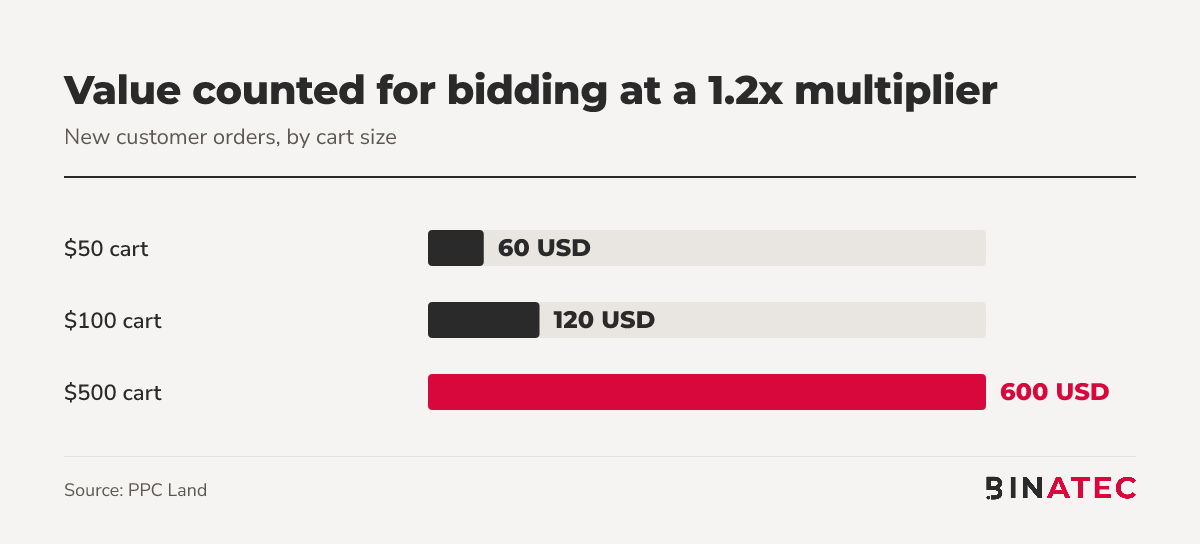
Notice the pattern: the extra value grows with the order. One condition from the same report: segments of current customers need at least 1,000 active members, managed in Audience manager.
The Three Retention Modes in Plain English
Retention goals aim at the customers you already have. Per Relevant Audience, there are three modes:
- Re-engagement: prioritises customers who haven't ordered in a while, while still serving your main audience.
- Loyalty: shows member-only pricing or messages to loyalty programme members.
- Retention Only: a campaign that reaches only the customer segments you specify. It's the only mode that does not keep normal reach.
Google's help page adds the practical bits. According to Google Ads Help, re-engagement relies on Customer Match lists of lapsed customers, and loyalty needs member lists plus loyalty benefits kept up to date in your Merchant Center feed.
That help page also recommends raising your budget by at least 20% initially when you set up re-engagement. Plan for that before you start.
A Quick Example: A Store With Two Basket Sizes
Take a home goods shop that sells $50 accessories and $1,000 furniture sets. Under a flat $20 bonus, the accessory buyer gets a 40% value uplift and the furniture buyer gets 2%.
That's backwards. With a 1.2x multiplier, both get 20%. PPC Land's comparison shows the same thing at the high end: on a $1,000 cart, a flat $20 bonus gives $1,020, while 1.2x gives $1,200.
Same shop, same ads. The bidding now chases the customers who are worth the most.
What to Do Before You Switch It On
A sensible order of work:
- Check customer identification. Lifecycle goals depend on first-party data and conversion tracking. If Google can't tell new from returning buyers, the bonus lands on the wrong people.
- Compare your flat value with real baskets. Look at your small and large orders and decide whether a percentage would fit better.
- Test one campaign. Relevant Audience suggests trying a multiplier in a single campaign first.
- Agree how you'll read ROAS. PPC Land notes multipliers inflate reported conversion value, and Google's Original Conversion Value metric shows values before these adjustments.
- Update your lists. Refresh loyalty and lapsed customer lists before using those modes, and handle the data under the privacy rules that apply to you.

Why the Timing Matters for Holiday Budgets
Google says the updates are rolling out ahead of the holidays, per Search Engine Roundtable. Gift season is when basket sizes swing most, from small stocking fillers to big-ticket presents.
That's exactly where a flat bonus misleads your bidding. A percentage keeps your bids honest across the whole range, so your budget leans toward the orders that pay back the most.
It also helps if you have a customer base worth bringing back. Retention modes let you speak to lapsed buyers and loyalty members in the same account that chases new ones, without a separate setup for each.
Not selling products? Service businesses can still learn from this. The principle, valuing a customer by what they're likely to be worth, applies to any lead-based account that passes values back to Google.
Where This Breaks Down
Multipliers aren't for everyone. If your orders are all roughly the same size, a flat value does the job and you gain little.
Be careful with thin data too. Google hasn't stated data requirements such as minimum list sizes or how lapsed customers are identified, according to Relevant Audience. Nor has it said whether your ROAS targets should change when multipliers are on.
There's also a timing risk. Switching on new bidding signals in the weeks before Black Friday leaves little room to learn. If your campaigns already perform well, test now and scale after the holidays.
FAQs
What are percentage multipliers in Google Ads?
They scale the extra value Google gives a new customer by the size of the cart, instead of adding a flat amount. At 1.2x, a $100 order counts as $120. They're rolling out this month across Search, Shopping, Performance Max and Demand Gen.
Do multipliers change my ROAS numbers?
Yes. PPC Land reports they inflate the conversion value Google shows, so ROAS can look higher without more real revenue. Use the Original Conversion Value metric to see values before these adjustments, and agree on one reading with finance.
What is Retention Only mode?
It's a campaign dedicated to existing customers that reaches only the segments you specify. Unlike Re-engagement and Loyalty modes, it doesn't keep normal reach, so it won't also find new buyers.
Is High Value Mode available for Shopping campaigns?
Yes, it's rolling out to Shopping campaigns in October 2026. It was already available for Search and Performance Max. It bids higher on new prospects likely to spend more.
Conclusion
The idea to hold on to: Google now lets you tell it that a big first order is worth more than a small one, in proportion. That's a real upgrade, if your data and your reporting are ready for it.
This week, pull your order values, check how new customers are identified in your account, and pick one campaign to test.
If you'd like a second pair of eyes on your setup, our Google Ads management and Shopping Ads teams can help, and you can get a free quote any time.
Sources
- Search Engine Roundtable: Google Ads Updates To Customer Lifecycle Goals For Holidays
- PPC Land: Google Ads lets retailers multiply new customer values up to 5x
- Relevant Audience: Google Ads lifecycle goals, multipliers and retention modes
- Google Ads Help: About the retention goal


John Doe
Supreb Information. Thanks
15 July 2014 View replies . 1