



Google Business Profile now lets restaurants switch off individual delivery apps. Here's what changed, what it costs you to leave them on, and how to decide.
Ever looked up your own restaurant on Google and found a big "Order" button that sends your best customers straight to DoorDash?
You didn't put it there. Google did, because a delivery app connected your menu to your listing. And every order that comes through it can cost you a slice of the bill.
Sound familiar?
On October 28, 2026, Search Engine Roundtable reported that Google Business Profile now lets restaurants manage third-party ordering providers one by one, and turn them off fully or partly. Here's what that means for your margins and your visibility, and how to decide what to switch off.
Key Takeaways
- Restaurants can now opt out of specific ordering providers such as Uber Eats, DoorDash, Instacart and Grubhub directly from their Google Business Profile dashboard.
- Before this, you had to ask each delivery platform to remove or disconnect its feed, which meant waiting on a support desk for each one.
- DoorDash's published delivery commissions run from 15% to 30% depending on plan, while pickup orders are charged 6%.
- Google's own advice is to keep a mix of providers, because diners often use the app where they already have a subscription or saved card.
- The smartest move is to audit each link for menu accuracy and margin, then decide which ones earn their place.
What Did Google Change?
Google's Lisa Landsman announced the update on LinkedIn, according to Search Engine Roundtable. The line that matters: restaurants can "manage and opt out of specific providers directly from your dashboard."
Previously, an app could stay on your listing until you chased it. In February 2024, Google started requiring providers to publish a removal link, but that link often led to a form or told you to contact the platform's support team.
Now the control sits where you already manage the rest of your profile.
That matters because the Business Profile is often the first thing a hungry local sees. If the buttons on it push people to the most expensive channel, you pay for that placement every single time, and you may never notice.
Landsman's post describes the request as coming from restaurant operators who wanted "more control over their ordering links." The reaction was blunt. One poster on the Local Search Forum called it long overdue.

How Do Ordering Links Work on Your Profile?
Google's help page explains the basics. In the US, third-party providers that have an authorised relationship with your business are listed automatically. You can also add your own custom ordering link for pickup and delivery.
You can set a preferred provider for pickup, delivery or both. You can't mark pickup or delivery as preferred if that provider doesn't offer it.
To take a provider off, open Food ordering, select it and choose "Remove link". Google says providers must take their links down within 5 business days of a request, and you can report a violation if one doesn't. To hide every third-party option at once, turn off "Accept orders on your profile". That hides them without deleting them.
The exact screens may differ from what's described here, since the new per-provider control is only just rolling out. Check your own dashboard before you plan around it.
What Does an Ordering Link Cost You?
That depends on the plan you picked with each app. DoorDash's pricing page lists delivery commissions of 15% on Basic, 25% on Plus and 30% on Premier, with 6% on pickup orders for all three.
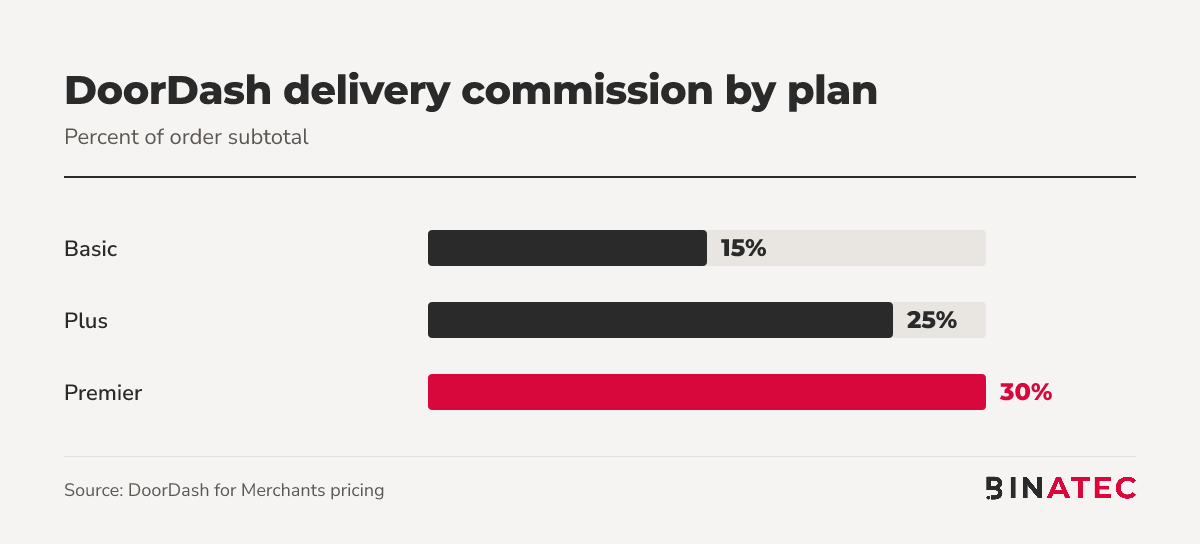
Run the arithmetic on a $40 delivery order. At 30%, that's $12 gone before food, labour or packaging. At 15%, it's $6. (That's simple maths on the published rates; your own contract may differ.)
The same page notes that orders placed through DoorDash's own Online Ordering product are commission-free but carry a payment processing fee. That's worth knowing if you want to steer regulars to your own channel.
Should You Switch Providers Off?
Not automatically. Google's guidance, as relayed by Search Engine Roundtable, is to keep a mix, because diners often use platforms where they already have subscriptions or saved payment details.
Think of each link as a small ad that sits on your most valuable page. Does it earn its fee?
Some apps bring you customers who would never have found you otherwise. Others mostly catch people who were already coming to you. The only way to tell them apart is to look at your order data by channel, not at the apps' dashboards alone.
Step 1: Check what's live today
Search your restaurant name on Google and Maps, on a phone, and write down every ordering option you see. Most owners are surprised by at least one.
Step 2: Test every link
Landsman recommends reviewing active channels to confirm each link leads to an accurate menu. Click through. Look for old prices, missing items and closed hours.
Step 3: Match each app to a plan and a margin
Find the commission you actually pay on each app. If one is on a premium tier and sends little business, it's a candidate to remove.
Step 4: Add your own ordering link
Google lets you add custom ordering links. A direct link to your own ordering page gives guests a lower-fee route, and you keep the customer relationship.
Step 5: Re-check in a month
Compare orders by channel before and after. Keep what pays for itself.
Give it at least a few weeks, so a quiet Tuesday doesn't fool you into changing course.

A Quick Example: A Neighbourhood Pizzeria
Picture a pizzeria with three ordering links on its profile: two delivery apps and a link to its own site. One app is on a 30% plan and has an outdated menu.
The owner fixes the menu on the app they keep, removes the expensive link, and sets their own site as the preferred option for pickup and delivery. Orders through their own site avoid marketplace commission entirely.
That's a hypothetical, not a result. It shows the decision framework: fix, remove, redirect.
When Switching Off Is the Wrong Call
If you're a new restaurant with little brand awareness, delivery apps may be how people find you at all. Removing a link there can cut orders, not just fees.
Also remember the change is reported for restaurants, and the details come from one announcement plus a screenshot. Treat the exact behaviour (such as whether you can split pickup from delivery) as something to verify in your own dashboard.
And be realistic about the rest of your listing. Hours, photos, menu and reviews do more for your map ranking than ordering buttons ever will. Our Local SEO services start there.
FAQs
Can I remove DoorDash from my Google Business Profile?
Yes. Open Food ordering in your profile, select the provider and choose "Remove link". Google's help page says providers must take the link down within 5 business days, and you can report a violation if they don't. The new per-provider control is meant to spare you the support ticket.
How do I hide all third-party ordering options at once?
Turn off "Accept orders on your profile" in Food ordering. According to Google's help page, this hides third-party order options from your profile without deleting them, so you can bring them back later if you change your mind.
How much does DoorDash charge restaurants?
DoorDash's pricing page lists 15% on Basic, 25% on Plus and 30% on Premier for delivery, and 6% for pickup. Orders through its Online Ordering product are commission-free but carry a payment processing fee. Your own terms may vary.
Can I add my own ordering link?
Yes. Google's help page says you can add custom ordering links for pickup and delivery, and set a preferred provider. A direct link is the simplest way to send guests to a channel where you keep the full order value.
Conclusion
The idea to keep: your Google profile is your most valuable shop window, and you now decide who's allowed to sell from it.
This week, search your own restaurant on a phone, click every ordering link and write down what each one costs you. Then fix, remove or redirect.
If you'd like a second pair of eyes on your listing and your local search setup, get a free quote and we'll take a look.
Sources
- Google Business Profiles adds per-provider ordering controls (Search Engine Roundtable)
- Google Business Profile Help: food ordering providers
- DoorDash for Merchants pricing
- Local Search Forum discussion
- Google requires providers to include removal link (Search Engine Roundtable, Feb 2024)


John Doe
Supreb Information. Thanks
15 July 2014 View replies . 1