



Google's Search Console control removes your site from AI Overviews and AI Mode. See what it covers, what it costs you and how to decide in minutes.
Your pages are probably being used to write Google's AI answers right now. Did you ever agree to that?
Until this year, you couldn't say no without also vanishing from regular search. That has changed. Google now has a setting in Search Console that takes your whole site out of AI Overviews and AI Mode, and on October 21 it put that setting on its official list of ways to control what you share with Search.
So should you flip the switch? For most businesses the answer is no, but only if you know what you'd give up. This post covers what the control does, what it costs, and how to decide.
Key Takeaways
- Google's Search generative AI control, found in Search Console settings, lets you exclude a whole site from AI Overviews, AI Mode and the generative AI features in Discover.
- Excluded sites lose all impressions and traffic from those AI features but, according to Google, still appear in regular Search results and the normal Discover feed.
- The control works per property, not per page, and you can't leave AI Overviews while staying in AI Mode, so it is an all-or-nothing choice.
- It does not stop AI training: that is a separate robots.txt matter, so opting out in Search Console alone does not cover Gemini model training.
- Most businesses that want leads and brand visibility are better off staying in and measuring AI impressions before they decide.
What Changed on October 21
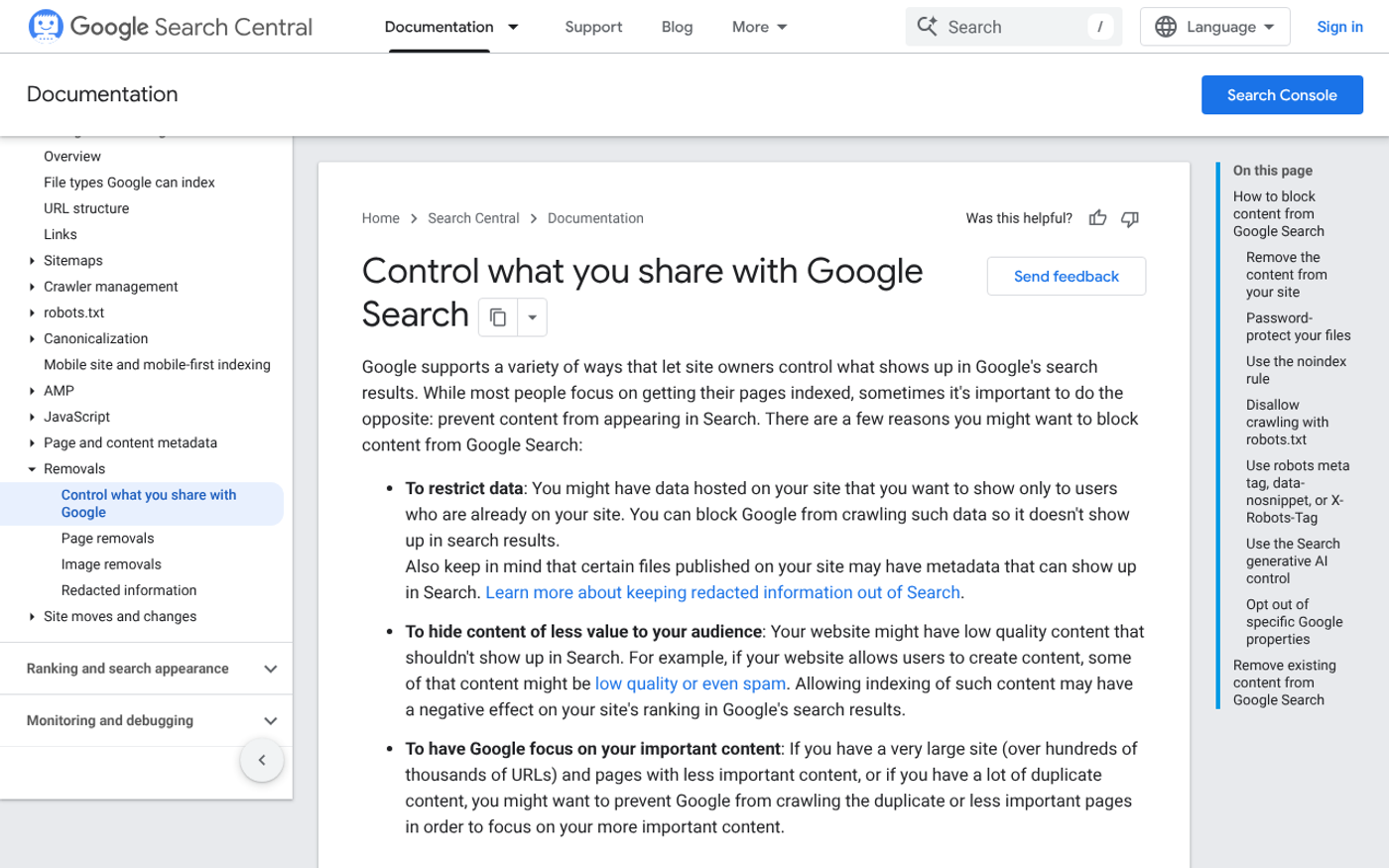
Google updated its control what you share with Google Search page on October 21, 2026. PPC Land reports that the page now lists seven methods, up from five in December 2025. The two new rows are the robots meta tag, `data-nosnippet` and `X-Robots-Tag` settings, and the Search generative AI control.
The control itself isn't new. Google announced it on June 2, starting with a subset of site owners in the UK before a wider rollout. What's new is that Google now presents it as a standard option next to noindex and password protection.
That matters because it signals this is a permanent part of how Google Search works, not a test.

What the Search Generative AI Control Actually Does
The setting lives under Settings in Search Console. Per Google's page, it covers your site's inclusion in generative AI features on Google Search, including AI Overviews and AI Mode. PPC Land adds that the linked Help page also names the generative AI features in Discover.
Here is how it behaves, based on the sources:
- Three options: include (the default), exclude, or inherit from a parent property.
- Site-wide: it applies to a whole verified property, not to individual pages.
- Timing: exclusion generally takes one to two days, though caching can delay some content, according to Search Engine Journal.
- Rankings: 9to5Google reports that Google says opting out won't affect regular Search rankings and won't be used as a ranking signal.
- Scope limits: it doesn't override your Merchant Center or Google Ads choices.
The global rollout of the setting is dated to August 31, 2026 on Google's Help page, as PPC Land notes. If you can't see it, check which property you're in.
What You Give Up by Opting Out
Opting out removes links to your site from those AI features. Search Engine Journal points out that any impressions and clicks you'd have received from them go with it.
That sounds obvious, but the reach is big. Google said at the June announcement that AI Overviews has over 2.5 billion monthly active users and AI Mode has over 1 billion. Those are Google's own figures, and they're the audience you'd be leaving.
There is also a risk nobody can size yet. NewzDash reported that Top Stories carousels showed inside AI Overviews for about 15.5% of its tracked US trending news results, per Search Engine Journal. One analyst there argues that opting out would likely pull publishers from Top Stories inside AI Overviews. Google hasn't confirmed this.
Treat that last point as a warning, not a fact. If news visibility drives your business, test before you commit.
What It Does Not Cover
This is where owners get caught. Google's page doesn't mention AI training at all, and PPC Land notes that site owners who want out of both AI Overviews and Gemini training still need the Search Console setting plus a robots.txt rule.
In plain terms, there are two separate doors:
- Search Console generative AI control: decides whether your content appears in Google's AI search answers.
- Google-Extended in robots.txt: decides whether your content can train future Gemini models, per Search Engine Journal.
Closing one doesn't close the other. Decide on each separately.
How to Decide: A Simple Test
Don't decide on instinct. Run this check first.
- Open Search Console and look at the generative AI performance report. Search Engine Journal says it shows impressions from AI features by page, country, device and date. It combines AI Overviews and AI Mode, and it shows no clicks or queries.
- List your top ten revenue pages and see which ones appear in that report. These are the pages where AI exposure is already working for you.
- Ask what the AI answer would say about you without your content. If a competitor fills the gap, opting out hands them the space.
- Check whether your content is the product. A publisher selling access to articles has a different case from a plumber who wants calls.
- Make a call per property. If you run a main site and a separate members area, you can set them differently.
The report has a catch: there is no clean way to tie AI visits to conversions, because standard analytics can't attribute visits to either AI feature. That is exactly why measurement should come before any switch. Our SEO reporting and forecasting work is built around closing that gap.

In Action: Two Businesses, Two Answers
Take two simple cases. These are illustrations of the decision logic, not client results.
A local accountancy wants enquiries. Being named in an AI answer about tax deadlines builds trust before anyone clicks, and the firm gives away its advice freely. Opting out buys nothing and risks losing visibility.
A paid research publisher is different. Its articles are the product, and an AI summary can replace the visit. Excluding the site may protect the subscription, and the visibility it loses is traffic that never paid anyway.
Same switch, opposite answers. The deciding factor is whether your content earns money by being read or by being found.
When Opting Out Is the Wrong Move
There are a few cases where the switch backfires.
- You depend on news or Discover visibility and haven't tested the Top Stories effect.
- You haven't looked at your AI impressions, so you don't know what you'd lose.
- Your real worry is AI training, which the Search Console control doesn't address.
- You want leads, and AI answers are one of the few places newer brands get mentioned beside bigger names.
If any of those fits, stay in and put the effort into being the source the AI quotes. Our GEO and AI search optimisation service covers exactly that, and strong technical SEO keeps your pages readable to the systems that pick sources.
FAQs
Can I opt out of AI Overviews without leaving Google Search?
Yes. Google says excluded sites still appear in regular Search results. The control removes you only from AI Overviews, AI Mode and the generative AI features in Discover, so your normal rankings stay in place.
Can I block only AI Mode and stay in AI Overviews?
No. The control applies to the whole list of Google's generative AI features on Search at once. There is no setting that separates AI Overviews from AI Mode, and no page-level option has launched yet.
Does the Search Console setting stop Gemini training on my content?
No. The Search Console control only governs inclusion in Google Search's AI features. Training is a separate matter handled with the Google-Extended token in robots.txt, so you need both if you want out of both.
How long does it take to work?
Search Engine Journal reports that content should drop out within one to two days, although caching can delay it. Search Engine Journal adds that changes can take a few days to process, so don't judge the result on day one.
Will opting out hurt my rankings?
Google says no. It states the control isn't used as a ranking signal and won't affect regular Search rankings. What you lose is the traffic and impressions from AI features, which are a separate source from normal results.
Conclusion
The real news isn't the switch. It's that Google now treats AI search inclusion as something you choose, and you'll be asked to justify whichever way you go.
This week, open the generative AI performance report in Search Console and write down which pages show up. If you can't say what those impressions are worth, you aren't ready to give them up.
If you'd like help reading that data and deciding, get a free quote and we'll talk it through with you.
Sources
- Google Search Central: Control what you share with Google Search
- PPC Land: Google lists 7 ways to keep content out of Search, AI opt-out included
- Search Engine Journal: What opting out of Google's AI search features means now
- 9to5Google: Google will let websites opt out of AI Mode and Overviews


John Doe
Supreb Information. Thanks
15 July 2014 View replies . 1